KaryoKEKaryograms for Karyotype Errors

How to use
<!--
This file is the "How to use" section at the top of the website's page.
Write it like a README: ### for headings (the section itself is the big heading), - for lists, **bold**, [link text](https://...).
Lines between these comment markers are not shown on the page.
After editing: commit, push, git pull on the VPS. The page changes at once; the "Last updated" date
changes after: sudo systemctl restart karyoke-web
To add a picture: put the PNG in static/images_how_to/ (for example static/images_how_to/zoom.png) and write
 <- the address always ends in .png (or .jpg/.gif/.svg) and leaves out "static"
-->
KaryoKE - Karyograms for Karyotype<sup><a id="cite-1" href="#ref-1">[1]</a></sup> Errors is a C++ program that draws one karyogram per cell from
Standard for DNA Damage (SDD)<sup><a id="cite-2" href="#ref-2">[2]</a></sup> or Standard for DNA Repair (SDR)<sup><a id="cite-3" href="#ref-3">[3]</a></sup>
data, so you can see at a glance which chromosomes are damaged or mutated.
### Quick start
1. Choose the **file type** and the **genome**.
2. Drop your file onto the dashed box, click **Choose File**, or paste the file's contents into the text box.
3. Click **Draw karyograms**.
4. When "Karyograms ready" appears, click **Open karyogram viewer** or **Download summary file**.
### The input section
- **File type**
- **SDR (mutations)**: an SDR file, with the mutations left after DNA repair modeled using MEDRAS-MC<sup><a id="cite-4" href="#ref-4">[4]</a></sup>.
- **SDD (DNA damage)**: an SDD file, with the DNA damage before repair.
- **Genome**
- **Human**: chromosomes are drawn with realistic human centromere positions based on the most recent GRCh38 build<sup><a id="cite-5" href="#ref-5">[5]</a></sup>.
- **Other**: generic centromere positions at 50% of the chromosomes length for any other genome.
- **Data**: a file or pasted text. If you do both, the file is used and the text box is ignored.
- **Draw karyograms**: sends the data to the server and runs KaryoKE. Large files can take a minute or two.
### The results
- **Open karyogram viewer**: opens the karyograms in a new tab.
- **Download summary file**: a text file with, for each cell, the number of each kind of mutation (SDR)
or damage (SDD), in total and by chromosome.
### The karyogram viewer
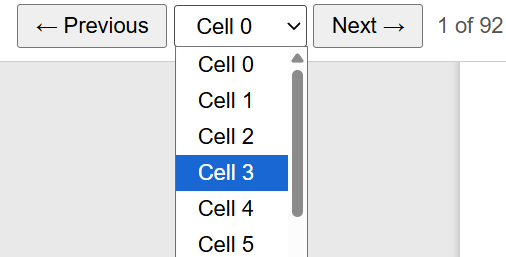
- Switching between cells: Top left of the karyogram viewer in the upper tool bar.
Select previous or next to scroll through each cell or select the dropdown list to choose a specific cell.
- Zooming in and out: Click - to zoom out, + to zoom in, Fit to fit the entire karyogram to the height of the page,
and 100% to zoom in to 100% zoom (maximum 600% zoom).

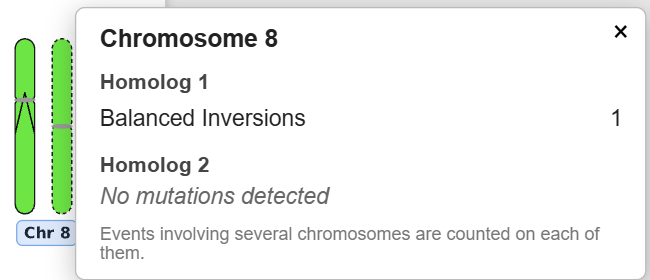
- Clicking a chromosome: Click on the chromosome label to see a summary of the damage types or the mutation types and
number of each drawn on each homolog of the chromosomes.
- Downloads: Top right of the karyogram viewer in the upper tool bar.
Download each karyogram as a PNG or SVG, or all of them at once as a .zip file.
### Limits and privacy
- Files can be up to 50 MB. For bigger files, use the KaryoKE program on your own computer.
- A run that takes longer than 5 minutes is stopped.
- Your data and results are kept on the server only to show them to you, and are deleted after 60 minutes.
### Common problems
- **"KaryoKE could not process this data"**: check that the file type matches the file (SDR or SDD).
The messages under the error come from KaryoKE and say what it could not read.
- **"The server is busy"**: other people are drawing karyograms. Try again in a minute.
- **"Results no longer available"**: results are deleted after 60 minutes. Run your data again.
### Citations
[1] <span id="ref-1"></span>https://github.com/kildealab/KaryoKE
[2] <span id="ref-2"></span>Schuemann, J., McNamara, A. L., Warmenhoven, J. W., Henthorn, N. T., Kirkby, K. J., Merchant, M. J., Ingram, S., Paganetti, H., Held, K. D., Ramos-Mendez, J., Faddegon, B., Perl, J., Goodhead, D. T., Plante, I., Rabus, H., Nettelbeck, H., Friedland, W., Kundrát, P., Ottolenghi, A., Baiocco, G., … McMahon, S. J. (2019). A New Standard DNA Damage (SDD) Data Format. Radiation research, 191(1), 76–92. https://doi.org/10.1667/RR15209.1
[3] <span id="ref-3"></span>https://github.com/Zhenlun/generate-standard-DNA-repair-with-medras-mc
[4] <span id="ref-4"></span>https://github.com/sjmcmahon/Medras-MC.git
[5] <span id="ref-5"></span>https://genome.ucsc.edu/cgi-bin/hgTables
Questions or problems: open an issue on [GitHub](https://github.com/kildealab/KaryoKE)
or contact the [Kildea Lab](https://kildealab.com).
Input SDD or SDR files
Upload or paste Standard for DNA Damage (SDD) or Standard for DNA Repair (SDR) data to see one karyogram per cell, and download the summary file. Limit: 50 MB.